


Cross-Midnight Shifts in SAP SuccessFactors: Understanding Shift Days, Breaks, Premiums and Overtime
7. October 2026
SAP TechEd 2026: Key Announcements on Joule, AI Agents and Enterprise Data
4. November 2026The SAP SuccessFactors 2H 2026 release introduces several Time Tracking updates, including Dynamic Shift Assignment, Effective-Dated Time Valuation, enhanced Business Rules and Time Sheet validations, Time Account Balance in Time Valuation, Attendance Quota enhancements, improved recalculation scenarios and a new Time Management navigation.
Some features introduce completely new possibilities, while others address limitations in existing configurations or reduce administrative effort.
Here are the Time Tracking updates worth taking a closer look at.
Dynamic Shift Assignment
One of the major additions in 2H 2026 is Dynamic Shift Assignment. Shifts can now be assigned automatically based on configurable rules instead of requiring administrators to assign them manually or use bulk uploads.
SAP supports two assignment strategies.
With clock-in-based assignment, the employee’s first clock-in is compared with configured clock-in bandwidths. An employee clocking in between 5:00 AM and 8:00 AM, for example, could automatically be assigned to an early shift.
Overlap-based assignment looks at the employee’s complete recorded working time instead. The system determines which day model has the greatest overlap with the actual recorded hours and assigns that model.
This is especially relevant in scenarios where there is no formal shift planning in the system and the applicable shift is determined based on actual working times. The dynamically assigned shift can then be used for calculations such as shift premiums.
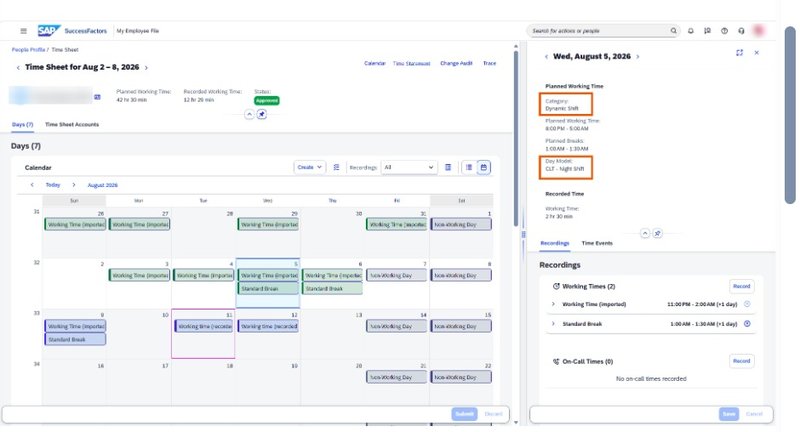
Dynamic Shift Assignment is customer configured. The setup requires SAP SuccessFactors Time Tracking, the relevant Work Schedules and Clock In Clock Out groups, as well as a Dynamic Shift Assignment Configuration and the corresponding business rule.
Employees can also view information about their dynamically assigned shifts in the Time Sheet and My Calendar features of the SAP SuccessFactors Mobile app.
Effective-Dated Time Valuation
Changes to Time Management policies can create considerable configuration work, especially when different versions of a policy need to apply from different dates.
Effective-Dated Time Valuation introduces a new way of handling these changes.
A single Time Valuation can now contain multiple effective-dated time slices. Each slice has its own start date and can contain different thresholds, Time Type Groups and filter settings. When recorded time is evaluated, the system selects the configuration that is effective for the relevant date.
For example, assume an overtime threshold changes from eight to ten hours effective July 1, 2026. Instead of creating a separate Time Recording Profile, two time slices can be maintained within the same Time Valuation:
- until June 30, 2026: 8-hour threshold
- from July 1, 2026: 10-hour threshold
Time recorded before July 1 is evaluated against the eight-hour threshold, while time recorded after the change is evaluated against ten hours. The Time Recording Profile itself remains unchanged, and no corresponding update to the employee’s Job Information is required.
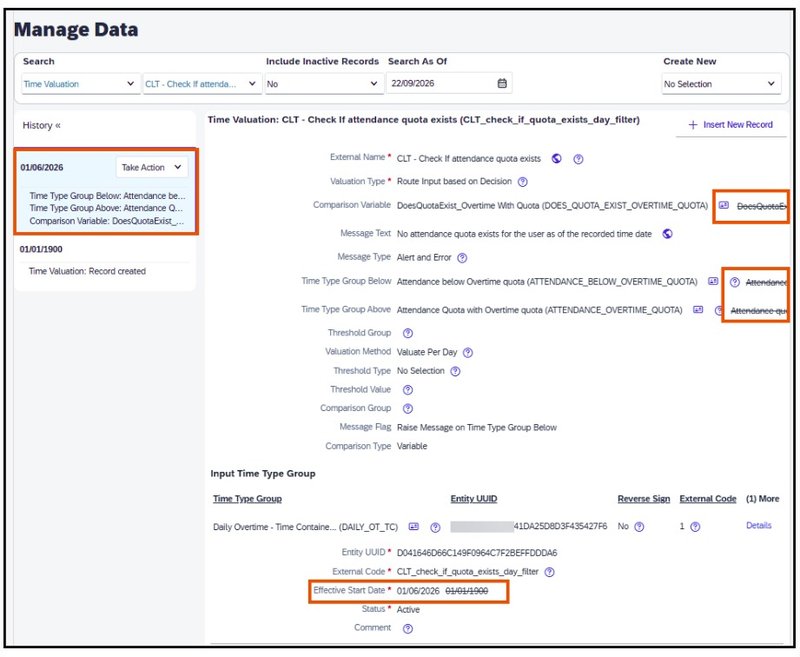
There is an important distinction depending on the Valuation Method. For Valuate Per Day and Valuate Up To Today, the daily Time Valuation results are considered.
For Valuate Whole Sheet or Period, the end date of the period determines which time slice applies. If a weekly Time Sheet runs from September 21 to September 27, for example, the time slice effective on September 27 is used for the calculation of that period.
This can reduce configuration maintenance for organizations that frequently change policies or currently maintain multiple Time Recording Profiles for different policy versions.
At the time of the 2H 2026 release, however, the feature has restricted availability. It is available by request and can only be configured once the request has been approved and Effective-Dated Time Valuation has been enabled through Upgrade Center > Recommended Upgrades.
More options for Business Rules in Time Valuations
Business Rules within Time Valuation also become more flexible.
Additional fields from Job Information can now be used in decision and calculation rules. These include custom fields as well as Standard Weekly Hours, Working Days Per Week, User ID, Company, Employee Type and Work Schedule.
SAP has also added new rule functions. These include Today(), Day of Week() and Day of Month(). A new absence-related function can retrieve the deduction quantity for an absence and can optionally take only approved absences into account.
Another change concerns the number of Business Rule Time Valuations that can be used within a Time Recording Profile. The previous limit of five increases to eight.
This gives administrators more options when valuation logic depends on employee or organizational data. SAP gives the example of daily premiums or bonuses where the relevant night-shift time corridor differs depending on company location or department.
Using Time Account Balances in Time Valuations
Another 2H 2026 change makes an employee’s Time Account balance available directly within Time Valuation.
The new Valuation Function valuation type provides the function Get Time Account Balances. Its result can then be used as an input for other Time Valuations later in the valuation chain.
At release, SAP supports the Time Account Categories Working Time Account, TOIL and Attendance Quota.
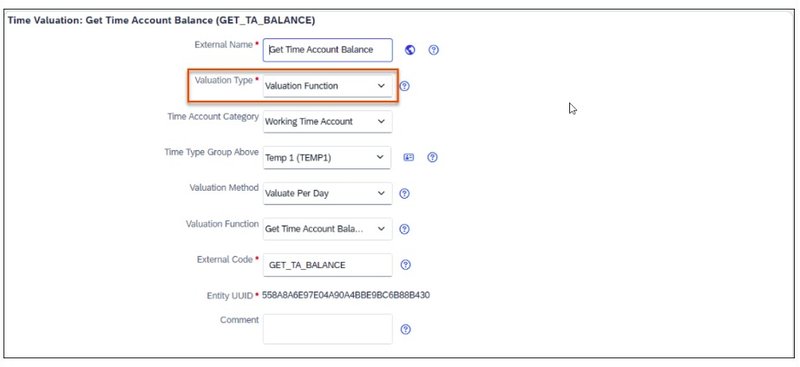
This opens up balance-dependent valuation scenarios. A configuration could, for example, react when an overtime balance exceeds a defined threshold or identify a low balance that requires action.
Previously, there was no corresponding Valuation Function for retrieving an employee’s Time Account balance within Time Valuation.
More valuation options for duration-based recording
Customers using the Duration Time Recording Variant also gain access to two additional valuation types.
Create Time Record can generate Time Type Group entries even when there is no planned time. One example provided by SAP is payment for a public holiday on a non-working day. The functionality can also be used for weekly overtime calculations in weeks containing absences for duration recorders.
Filter Single Records from Input Groups can exclude time records that require single-record approval but have not yet been approved. Only eligible records then continue into subsequent Time Type Groups.
This makes these scenarios available for duration-based recording without requiring corresponding Business Rule workarounds.
More detailed Time Sheet Validation Rules
Time Sheet Validation Rules receive additional options in 2H 2026, including functionality specifically for Consolidated Time Recording (CTR).
A validation rule can now calculate the total aggregated hours for a particular Time Type across all matching entries on a day. If an employee has several entries for the same Time Type, the rule can therefore evaluate their combined quantity.
For Consolidated Time Recording, validation rules can also use cumulative Time Type hours across all days within a Time Sheet Period. The External Code of the current Time Sheet as well as the current Time Sheet Period start and end dates can also be used.
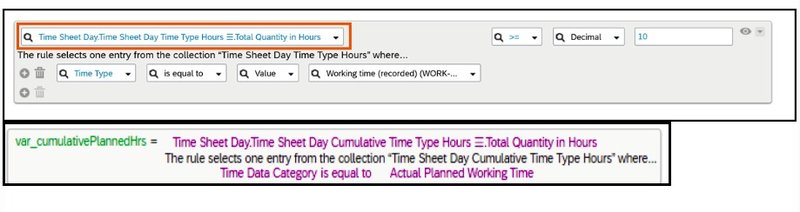
These additions are particularly useful for validation scenarios that depend on aggregated or period-based information rather than a single Time Sheet entry.
Attendance Quotas receive several improvements
Attendance Quotas receive a number of smaller changes with 2H 2026.
The order of Allowed Weekdays now follows the logged-in user’s locale. This means that the first day of the week can, for example, be Sunday for a user in the United States and Monday for a user in Europe or India.
Cross-midnight scenarios are addressed through the new Applicable Day field. The day indicator can be used to determine which calendar day a time restriction belongs to. For overnight shifts, for example, Next Day can be selected when approved overtime after midnight should belong to the following day.
There is also a change to Limited Attendance Quotas. Quotas with a defined maximum can now be deleted, with the system automatically recalculating affected periods and dependent results.
For API consumers, Attendance Quota results are now sorted by time period and then quota type by default when no explicit sort parameters are provided.
These Attendance Quota enhancements are automatically enabled.
Original Shift Classification for shift change premiums
Another update addresses scenarios where an employee works a different shift from the one originally planned.
Time Valuation can now access the original planned shift classification, even if the employee’s shift has subsequently been changed through Temporary Time Information.
The new Work Schedule Source field in the Time Records Filter makes the original classification available as an input for valuation. This allows a Time Valuation to compare the originally assigned shift with the actual shift and use that information when determining shift change premiums.
Previously, Time Record Filters could no longer access the original shift classification after a shift had been changed through Temporary Time Information.
SAP notes that this is primarily intended for duration recorders, although it can also be used in other scenarios such as clock-time recording.
Individual Work Schedule changes trigger recalculation
Changes to Individual Work Schedules that are part of a Temporary Time Information record can now automatically trigger recalculation of related Time Management data and replication to Employee Central Payroll.
The affected data can include absences, Time Account balances, accruals and, where enabled, Time Sheet records. SAP also raises a planned-working-time replication event so that the updated schedule can be synchronized with Employee Central Payroll.
Only structural changes affecting working times, patterns or dates trigger the process. Changes limited to custom fields do not. The immediate trigger also applies only to active, approved Temporary Time Information records.
Previously, changes made to an Individual Work Schedule through Manage Data, imports or integrations did not trigger recalculation and Employee Central Payroll replication in the same way. With 2H 2026, this behavior also covers these maintenance paths.
This change is automatically enabled.
Recalculation for Consolidated Time Recording
There is another recalculation change for customers using Consolidated Time Recording with SAP S/4HANA Cloud Private Edition My Timesheet (Version 4).
Attendances replicated from My Timesheet to the SAP SuccessFactors Time Sheet can now be included in recalculation.
Recalculation in SuccessFactors can update underlying Time Valuations, overtime and allowances following relevant retroactive changes without changing or overwriting the original data in SAP S/4HANA Cloud Private Edition My Timesheet.
There are specific rules for breaks. When a Work Schedule changes, fixed or manually recorded breaks originating from Consolidated Time Recording are not updated in the SuccessFactors Time Sheet according to the new schedule. These entries are treated as manually entered Time Sheet records.
In previous releases, recalculation of these replicated attendances was not supported.
The change is automatically enabled.
New options for bulk time events and geofences
Two further updates concern Clock In Clock Out scenarios.
SAP introduces a new Clock In Clock Out Bulk Time Events REST API for bulk operations. The API provides improved validation, error handling and standardized HTTP response codes. It serves as an enhanced API for operations previously handled through the existing individual bulk creation and deletion APIs.
There is also a new option for Bulk Migration of Geofences Between Instances. Administrators can export geofences from one instance and import them into another using a GeoJSON template from the Manage Geofences page.
This can simplify the movement of geofence configurations between system environments.
A dedicated Time Management module in the main menu
One of the more visible 2H 2026 changes is the introduction of a dedicated Time Management section in the SAP SuccessFactors main menu.
Employees and managers with the relevant permissions can access their time-related applications from this central location. Depending on the available functionality and permissions, this can include Time Sheet, Time Off, My Calendar, Attendance Quotas and other Time Management applications.
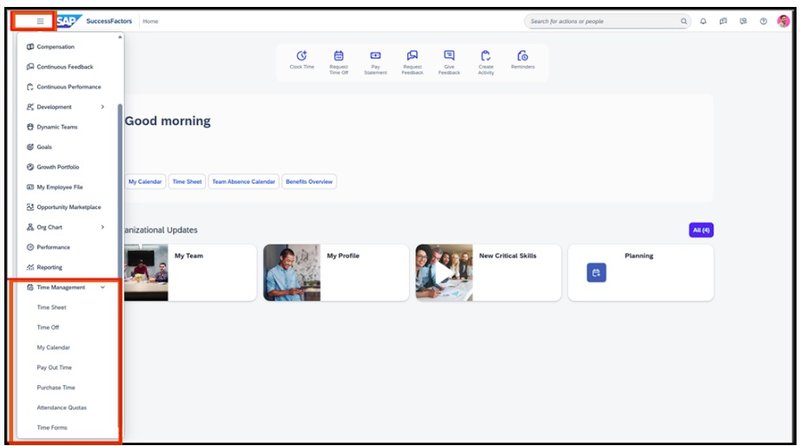
The new side navigation leads directly to Employee Self-Service pages. Breadcrumbs on these pages no longer reference People Profile, while legacy navigation paths remain available during the transition period.
The feature is customer configured. Among the configuration requirements, “Enable SAP user experience updates” and “Enable Side Navigation for Time Management” need to be enabled in Company System and Logo Settings. Users also need the relevant permissions for the Time Management features they should be able to access.
Work Schedule Finder no longer depends on a visible Time Recording Variant
There is also a change to the Work Schedule Finder.
Previously, the Time Recording Variant had to be filled and visible in Job Information for the Work Schedule Finder to open. If the value was unavailable because the field was hidden, disabled or removed, the system returned an error.
With 2H 2026, “Choose Existing Work Schedule” and “Copy and Adapt Existing Work Schedule” remain available even when the Time Recording Variant is unavailable. In this case, Work Schedules for both Time Recording Variants are shown.
“Create Individual Work Schedule” behaves differently. The option is grayed out when the Time Recording Variant information is unavailable, and the page displays the reason.
This is relevant for configurations where a single Time Recording Variant is used and its value is populated through a rule when Job Information is saved.
What should customers prepare for?
The Time Tracking changes in 2H 2026 have different enablement approaches, so preparation depends heavily on the functionality already in use.
Customers with complex Time Valuation configurations should review the new Business Rule options, Time Account Balance functionality and additional possibilities for duration-based recording. For organizations that regularly adapt Time Management policies, effective-dated Time Valuation is also worth examining, keeping its restricted availability in mind.
Customers working with Temporary Time Information should review the changed recalculation behavior and the possibility of using the original shift classification in premium calculations. Consolidated Time Recording customers have separate changes around validation and recalculation to consider.
Dynamic Shift Assignment is particularly relevant where shifts are derived from employees’ actual recorded working times. Since the functionality is customer configured, the existing Work Schedules, Clock In Clock Out groups and required configuration objects and rules need to be considered before introducing it.
It is also worth distinguishing between features that require configuration and changes that are automatically enabled. Attendance Quota enhancements and the changed recalculation behavior for Individual Work Schedules, for example, are automatically on, while Dynamic Shift Assignment, Time Account Balance in Time Valuation and the new Time Management navigation require customer configuration.
SAP SuccessFactors Time Tracking at Clarity Solutions
The 2H 2026 release adds new options across several parts of SAP SuccessFactors Time Tracking. Which changes are relevant depends on the existing Time Management setup, recording scenarios and valuation requirements.
At Clarity Solutions, we support companies with the design, implementation and optimization of SAP SuccessFactors Time Management and Time Tracking. We can help assess the 2H 2026 changes in the context of your existing configuration and identify where adjustments or new functionality are relevant.


