


SAP SuccessFactors + SAP BTP: When does an extension make sense?
23. September 2026
SAP SuccessFactors 2H 2026: What’s New in Time Tracking?
14. October 2026SAP SuccessFactors Cross-Midnight Shifts are used when a planned or recorded shift ends after midnight. A night shift from Monday 10:00 PM to Tuesday 6:00 AM may seem straightforward at first, but it raises several questions when it comes to time valuation: Which day are the hours assigned to? How are breaks and night premiums handled? What happens if a public holiday begins at midnight? And how does the shift affect overtime calculation?
SAP SuccessFactors Time Tracking handles these scenarios through Cross-Midnight Processing. The key distinction is between the Shift Day and the actual calendar day on which a time segment occurs. The data of a shift is generally processed on the Shift Day. This also applies to Time Valuations. For requirements where the next physical calendar day is relevant, SAP provides additional functionality.
Throughout this article, we will use the same example: a shift from Monday 10:00 PM to Tuesday 6:00 AM. Tuesday is a public holiday, and there is a break from 1:00 AM to 1:30 AM.
Which day is a cross-midnight shift assigned to?
For a Cross-Midnight Shift, the Shift Day is the starting point.
If the shift starts on Monday at 10:00 PM and ends on Tuesday at 6:00 AM, it is processed on Monday. SAP SuccessFactors therefore treats the hours after midnight as part of the shift that started on Monday. The fact that these hours physically occur on Tuesday does not change the Shift Day.
For our example, this means:
| Time period | Physical calendar day | Shift day |
|---|---|---|
| 10:00 PM to 12:00 AM | Monday | Monday |
| 12:00 AM to 6:00 AM | Tuesday | Monday |
This distinction is important. The hours after midnight remain part of the same shift, but they can still be handled differently within a Time Valuation.
This is where the Next Day Indicator in the Time Segment Filter comes into play. It can be used to identify whether a time segment falls on the Shift Day or on the following physical calendar day.
What happens to breaks after midnight?
A break that starts after midnight also remains part of the same Cross-Midnight Shift.
In our example, the employee works from 10:00 PM to 6:00 AM and takes a break from 1:00 AM to 1:30 AM. The break physically takes place on Tuesday but still belongs to the Monday shift.
Times on the following calendar day are displayed with +1 day.
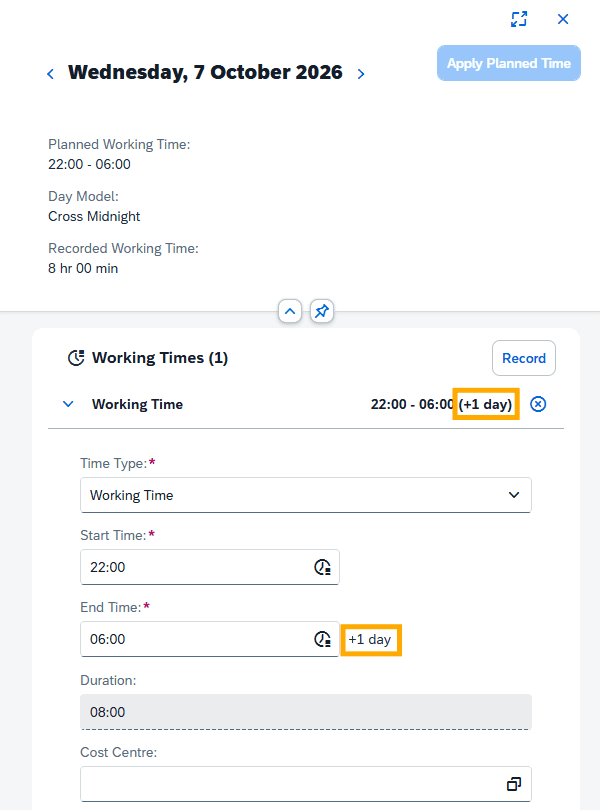
In SAP's example, scheduled breaks at 1:00 AM and 5:30 AM occur on the next physical day but are still considered part of the same shift.
The break is deducted accordingly when calculating net working time.
For a shift from 10:00 PM to 6:00 AM with a 30-minute break:
8 hours of attendance – 30-minute break = 7 hours and 30 minutes of net working time
For the configuration, it is therefore important to consider where the break occurs within the shift and how it is defined in the respective work schedule or break logic
How does SAP SuccessFactors calculate night premiums?
A night shift does not necessarily need to receive the same premium for the entire period.
For example, a company could define different premium periods:
10:00 PM to 12:00 AM: Night Premium A
12:00 AM to 4:00 AM: Night Premium B
4:00 AM to 6:00 AM: Regular valuation
SAP SuccessFactors can distinguish between these periods using Time Valuations. For Cross-Midnight scenarios, it is particularly relevant that time after midnight can be identified separately using the Next Day Indicator.
Which time segments receive a night premium and how high that premium is depends on the customer-specific configuration of the Time Valuations. The following table therefore shows one possible valuation logic and does not represent a standard premium calculation predefined by SAP SuccessFactors.
For our example, the valuation could therefore look like this:
| Time | Possible valuation |
|---|---|
| 10:00 PM to 12:00 AM | Night Premium |
| 12:00 AM to 1:00 AM | Next Day Night Premium |
| 1:00 AM to 1:30 AM | Break |
| 1:30 AM to 6:00 AM | Next Day Night Premium |
The actual premium amount and the periods to which it applies are determined by the company's specific requirements and configuration. SAP SuccessFactors provides the Time Valuation functionality needed to distinguish between the relevant time segments and value them according to the defined rules.
What happens if a public holiday starts at midnight?
This is where the distinction between the Shift Day and the physical calendar day becomes particularly important.
Let's assume Monday is a regular working day. The employee starts the shift at 10:00 PM, and Tuesday is a public holiday.
Whether and how working time on a public holiday receives a premium also depends on the configured Time Valuations and the respective business rules. The following example shows one possible configuration where Tuesday is a public holiday.
| Time period | Physical day | Possible valuation |
|---|---|---|
| 10:00 PM to 12:00 AM | Monday | Night Premium |
| 12:00 AM to 1:00 AM | Tuesday, public holiday | Holiday Night Premium |
| 1:00 AM to 1:30 AM | Tuesday, public holiday | Break |
| 1:30 AM to 6:00 AM | Tuesday, public holiday | Holiday Night Premium |
Midnight therefore does not automatically split the shift into two separate working days. Within the Time Valuations, however, it can be a relevant boundary for applying different valuation rules to individual time segments.
How do Work Schedule and Time Valuations work together?
In a Cross-Midnight Shift, Work Schedule and Time Valuations have different responsibilities.
The Work Schedule first describes the planned working time.
For a Work Schedule Day Model with the Time Recording Variant “Clock Times”, the “Cross Midnight Allowed” setting is available. If this is set to “Yes”, a start time before midnight can be combined with an end time on the following day.
A Day Model could, for example, contain:
Scheduled Working Time: 10:00 PM to 6:00 AM
Scheduled Break: 1:00 AM to 1:30 AM
Cross Midnight Allowed: Yes
This first defines when the employee is expected to work.
The Time Valuations then answer different questions:
Which hours count as regular working time?
Which time segments receive a night premium?
Does a segment fall on the next physical day?
Is that day a public holiday?
When is an overtime threshold exceeded?
The Work Schedule therefore represents the planned shift. The Time Valuations determine how the recorded working time is evaluated.
For shifts that cross midnight, both areas need to be aligned. A correctly planned shift alone does not ensure that night, public holiday or overtime premiums are calculated in line with the business requirement.
How is overtime calculated for Cross-Midnight Shifts?
Midnight does not automatically restart the valuation when it comes to overtime.
SAP processes all data and Time Valuations of a Cross-Midnight Shift on the Shift Day. Working time after midnight can therefore still be included in the valuation of the entire shift.
A simple example:
The relevant daily threshold in the customer-specific configuration is 8 hours of net working time.
The employee works:
10:00 PM to 7:00 AM
30-minute break
This results in 8 hours and 30 minutes of net working time.
If the configured Time Valuation triggers overtime after eight hours, the final 30 minutes could be processed as overtime. The fact that several hours of the shift physically occur on Tuesday does not by itself mean that the calculation restarts at midnight.
The exact valuation still depends on the configured overtime logic. This becomes particularly relevant when several conditions apply at the same time.
A time period can, for example:
– fall on the next physical day,
– fall within a Night Premium period,
– fall on a public holiday,
– and at the same time exceed an overtime threshold.
The resulting Time Valuation results depend on the specific configuration and the sequence of the valuations.
Example: Monday 10:00 PM to Tuesday 6:00 AM
Let's bring the example together once more.
The employee starts work on Monday at 10:00 PM. Tuesday is a public holiday. There is a break between 1:00 AM and 1:30 AM. The shift ends on Tuesday at 6:00 AM.
| Time | Physical day | What needs to be considered |
|---|---|---|
| 10:00 PM to 12:00 AM | Monday | Shift Day, night premium |
| 12:00 AM to 1:00 AM | Tuesday | Next Day, public holiday check, night premium |
| 1:00 AM to 1:30 AM | Tuesday | Break |
| 1:30 AM to 6:00 AM | Tuesday | Next Day, public holiday check, night premium |
| Entire shift | Monday as Shift Day | Net working time and possible overtime valuation |
For processing purposes, Monday remains the relevant Shift Day.
For the valuation of individual time segments, it can still be relevant that the time after midnight physically falls on Tuesday.
This combination allows SAP SuccessFactors to process one continuous night shift while still applying different rules for public holidays, night periods and overtime.
Frequently asked questions about Cross-Midnight Shifts in SAP SuccessFactors
Are hours after midnight automatically assigned to the next day?
No. The data of a Cross-Midnight Shift is generally processed on the Shift Day, meaning the day on which the shift started. Within the Time Valuation, however, time segments after midnight can still be identified as occurring on the next physical day.
Can SAP SuccessFactors recognize that a public holiday starts after midnight?
Yes. In the context of Cross-Midnight Processing, SAP SuccessFactors can check whether the next physical day is a public holiday. This makes it possible to apply the relevant valuation rules to the affected time segments.
Can breaks after midnight remain part of the same shift?
Yes. Scheduled breaks can occur after midnight within the same Cross-Midnight Shift. They are taken into account accordingly when calculating net working time.
Does overtime calculation automatically restart at midnight?
No. Midnight alone does not create a new Shift Day for a Cross-Midnight Shift. How overtime is calculated depends on the configured Time Valuations and the applicable overtime rules.
One shift, multiple valuation rules
Shifts that cross midnight show how several elements of SAP SuccessFactors Time Tracking configuration need to work together.
The Work Schedule needs to represent the planned shift correctly. Breaks need to be considered at the right point. Time Valuations need to recognize which time segments fall on the Shift Day and which fall on the next physical calendar day. Public holidays, night periods and overtime rules can then produce different results for individual parts of the same shift.
A Cross-Midnight configuration should therefore be tested with different realistic scenarios. These include regular night shifts, transitions into weekends or public holidays, and combinations of night premiums and overtime.
At Clarity Solutions, we support organizations with the design and implementation of complex SAP SuccessFactors Time Tracking configurations. We help ensure that Work Schedules, Time Valuations, breaks, premium logic and overtime calculations work together in line with the relevant working time model.


